🔥 CrdPro SolFront.org 🔥
🚀 Register FREE to unlock exclusive discussions and community content.
🔥
ADVERTISE YOUR BUSINESS HERE
🚀
📢 Banner Ads •
⭐ Featured Listings •
📌 Sticky Threads •
🤝 Partnerships
💰 Reach Thousands of Potential Customers Today!
You are using an out of date browser. It may not display this or other websites correctly.
You should upgrade or use an
alternative browser.
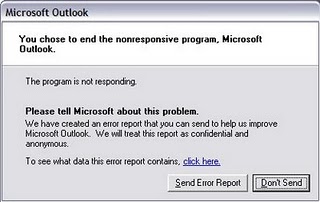
Disable the Error Report in Windows XP
🔥 VERIFIED & TRUSTED SELLER 🔥
Staff member
💎 VERIFIED & TRUSTED SELLER 💎

Are you getting often error report in windows xp? this trick will disable the error report creation.
- Right-click My Computer and choose Properties.
- Click the Advanced tab on your System Properties dialog box.
- Click the Error Reporting button on the Advanced tab.
- Place a checkmark next to “Disable error reporting.”
- Leave the other radio button unchecked next to the text labeled, “But notify me when critical errors occur.“
- Click OK.
that’s all you finished. From now error reports will not disturb you.